Remixing a part
Most models you download are an STL or a 3MF, sometimes a STEP. b123d-print can start from one and change it: a bigger screw hole, slots instead of holes, a gusset, a longer arm. Two ways:
- Modify (the default): load the original as a solid with
import_modeland add or cut features with named dimensions. Nothing of the original is lost. Use it for STEP files, for organic or detailed meshes, and for small changes to anything. - Redraw: model the part again from
Dims, then check the redraw against the original withcompare(orbefore_after) before changing any proportion. Offer it for a simple prismatic mesh whose proportions change (longer, wider, another screw size), where a parametric model is worth having.
The MCP prompt remix_part walks an agent through all of it: get the file, inspect it, propose
modify or redraw with reasons, list the changes and wait for your confirmation, then build,
check and export.
Get the original onto the server
Reference files live in the part's folder, parts/<part>/ref/<file>, so the script reads
them as import_model("ref/<file>") and the sandbox lets it (it can read the
workspace). A workspace-wide refs/ folder works too, for files several parts share. The
part folder may exist before the part does: upload first, then new_part.
| Where the server runs | How the file gets there |
|---|---|
| On your machine (stdio) | copy it into parts/<part>/ref/: it is a local folder |
| Over SSH | b123d-print push bracket.stl --part bracket --to me@cad, on your machine, with the same key as the MCP connection |
| Over HTTP | the upload_reference tool returns a signed upload link; run curl -fT bracket.stl '<link>' on your machine (no token needed; it expires and writes only that one file) |
Every way refuses names with folders in them, hidden names, other suffixes than .stl, .3mf,
.step and .stp, content that is not what the suffix says, symlinks, files over 50 MB, and
replacing an existing file unless asked to (--overwrite, overwrite=true).
upload_reference also takes the file itself as base64 (data_base64). That works from any
client, but the model has to write out every byte of it, which is slow and expensive for
anything but a small file; for the rest, the link (HTTP) or push (SSH) is the way. Clients
that let you attach a file to the chat still pass it to the model, not to the server.
Inspect it first
describe_model(part, file) (or b123d-print to-step <file> on the command line) reports:
- format, the file's units, size, volume, and a warning when the size suggests the wrong unit
(a 3 mm "bracket" was probably drawn in inches: pass
scale="inch"); - triangles, and faces before and after merging coplanar triangles; how much of the surface is curved and so stays faceted;
- round holes (diameter, axis, center), found even on a faceted mesh;
- repairs made, the designer and license if the file says (3MF metadata, the STEP header);
- a suggestion: modify, or modify or redraw, and why.
What import_model does
from b123d_print import import_model

def build(d):
    part = import_model("ref/bracket.stl")             # a solid, in the file's position
    part -= Pos(d.HOLE_X, 0, 0) * Cylinder((d.HOLE_D + d.HOLE_COMP) / 2, 20)
    return part
- STEP gives the exact solid, converted to mm from whatever unit the file uses.
- STL and 3MF become a solid: coincident vertices welded, degenerate and duplicate triangles dropped, gaps of up to 8 edges closed, triangles turned to face one way and outward, then neighboring coplanar triangles merged into one planar face each (a box comes back as 6 faces, a plate with a hole as a face with an inner loop). STL has no units and is read as mm; 3MF units are honored.
- Curves stay faceted. There is no curve fitting: a round hole in a mesh is a polygon of
narrow faces. To change one, cut a real cylinder at its center (
describe_modelgives it); to make a fillet round again, redraw. - A mesh that is still open or non-manifold after that is refused, with the number of bad edges, where they are, and how to repair it (PrusaSlicer or Bambu Studio: right-click > Fix model; Meshmixer: Analysis > Inspector).
- Meshes over
max_triangles(a setting, default 50,000) are refused with advice to simplify them first. Measured on a generated 41,000-triangle remix (tools/bench_mesh_checks.py, Apple M4): the firstchecktakes about 45 s, converting the mesh included; later ones about 25 s, with the conversion and the original's findings cached. A slower CPU takes two to three times that, so twice the triangles would not fit the 300 s check limit. A slicer prints a 50,000-triangle model as well as a finer one. scale=takes a factor or the unit the file was drawn in ("inch","cm","m").- The conversion is cached in the part's
out/.cache/, keyed by the file's content, so build, render, section and check do not repeat it. The checks on the original (below) are cached there too, so after the firstcheckonly the remix is checked.
Inherited findings
A downloaded model often already has things the checks flag: an overhang over a faceted hole, a knife edge, a fillet on the bed. When a script imports a model, the automatic checks (overhang and bridges, thin features, holes, bed edges, gaps) also run on the original, and a finding of the remix whose spots the original already had says so:
[WARN] overhang part: inherited from the original: 11 face(s), 20 mm^2 steeper than 45 deg: ...
[WARN] overhang part: 3 face(s) ... [2 of 3 listed spots inherited from the original; new in the remix: (-25, 0, 26)]
A thin spot of the remix that is not among the original's listed spots is measured on the original itself: equal features (four identical clips) tie, and which of them a section reports is arbitrary, so comparing the two lists alone would call some inherited knife edges new.
An inherited finding is reported but never fails the check (a FAIL on the original becomes a
WARN, saying so): it is not the remix's to fix unless you ask. New findings are the remix's
and count as usual. Each import also gets an import line in the check results: what was
loaded, the repairs, and a warning when its units look wrong.
The original is what build(d) loaded with import_model, in the file's position. If the
remix turns or moves it (say, to print on another face), add original(d) to the script
returning the original placed the same way; otherwise the spots do not line up and every
finding counts as new.
Before and after
before_after(name) (and every export that writes PNGs) shows the original and the remix side
by side, and the original colored where the remix differs (compare's deviation
view), with compare's score.
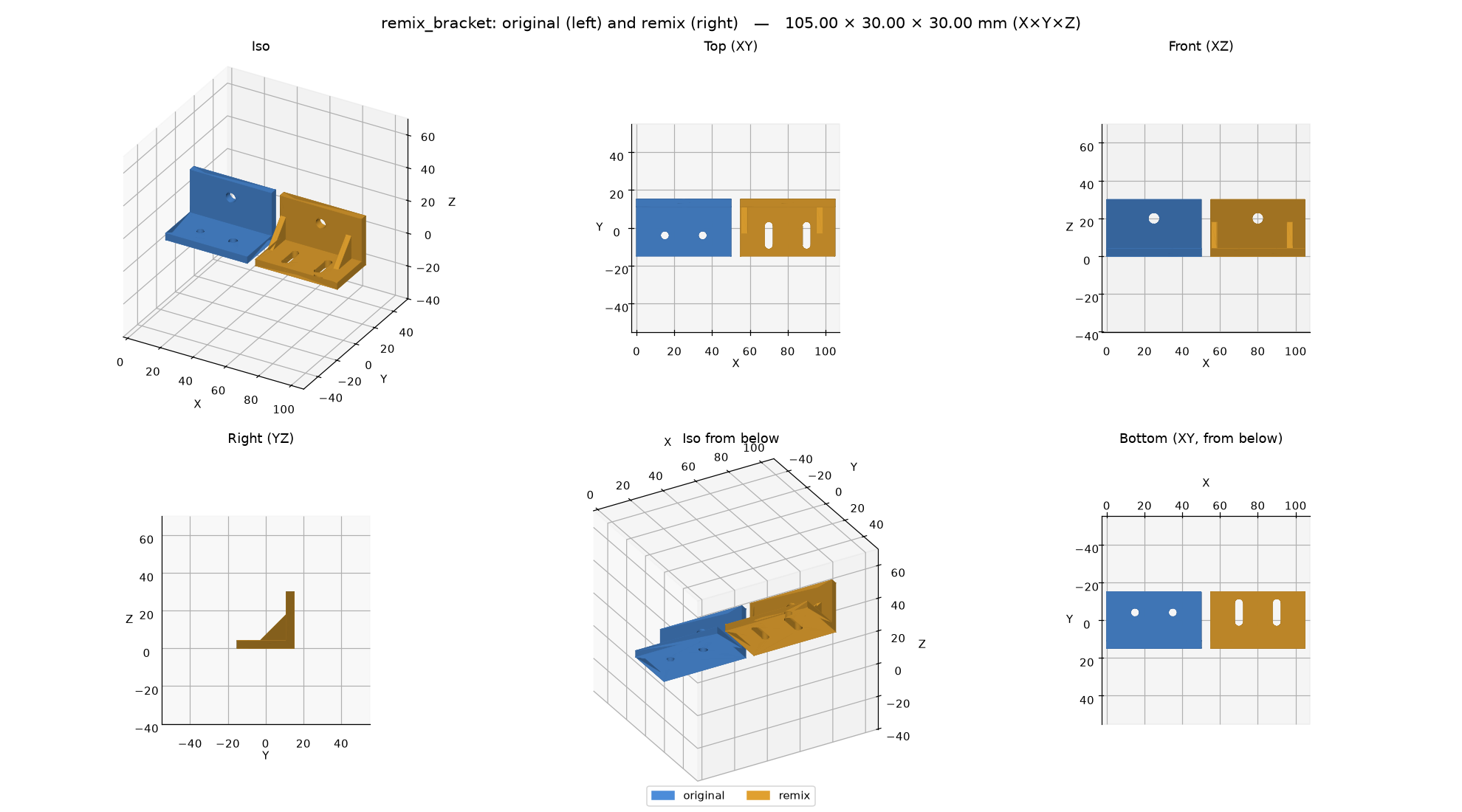
For a redraw, define original(d) returning import_model("ref/<file>") placed like the
redraw, and call before_after before changing anything: the unchanged redraw should match
the original closely (look at the score and the red in the deviation view), which proves the
redraw before it is changed.
Licenses
Record the source URL, the author and the license in the script's docstring. Before remixing,
check the license: -ND (NoDerivatives) allows no remixes; -NC (NonCommercial) means no
commercial use of the remix either; BY means credit the author when you share it ("Remix of
title by author, license, URL"); SA means the remix takes the same license. The
remix_part prompt asks for these and warns on -ND.
See the remix_bracket example.