Sketch first
Many printed parts are a 2D shape made solid: a bracket or a plate is an outline extruded, a knob or a pulley is a profile turned about an axis, a hook is a section swept along a path. For those, drawing and agreeing on the 2D sketch before any 3D gives a cleaner part than stacking boxes and cylinders, and it is quicker to check: one flat picture with its dimensions.
Sketch first is optional, per part. The AI offers it when the part fits: outlines extruded flat (brackets, plates, clips, spacers, gaskets), profiles revolved (knobs, pulleys, spool parts, bushings) and sections swept (hooks, handles). It does not offer it for boxy enclosures (a box, a shell, a lid) or for organic shapes, which have their own recipes. Say no and it models the part as usual.
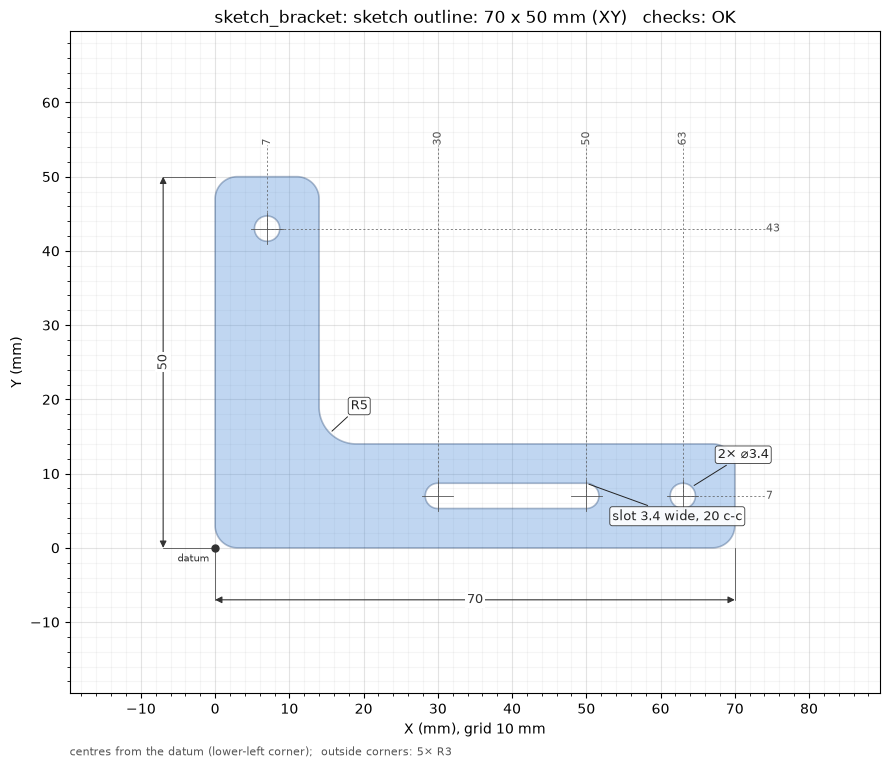
The sketch_bracket example's outline: overall size,
holes grouped by size, the slot, the inside radius, hole and slot centres measured from the
lower-left corner.
How it goes
- Dimensions first, as always: the AI lists what it read and waits for you to confirm.
-
The sketch.
new_part(name, sketch_first=True)(CLIb123d-print new <name> --sketch) starts a script with asketches(d)hook next tobuild(d):from b123d_print.recipes import bed_chamfer, rounded_outline, slot def outline(d): pts = [(0, 0), (d.ARM_X, 0), (d.ARM_X, d.ARM_W), (d.ARM_W, d.ARM_W), (d.ARM_W, d.ARM_Y), (0, d.ARM_Y)] s = rounded_outline(pts, [d.CORNER_R, d.CORNER_R, d.CORNER_R, d.INSIDE_R, d.CORNER_R, d.CORNER_R]) s -= Pos(d.ARM_X - d.HOLE_INSET, d.ARM_W / 2) * Circle((d.HOLE_D + d.HOLE_COMP) / 2) s -= slot((d.SLOT_FROM, d.ARM_W / 2), (d.SLOT_TO, d.ARM_W / 2), d.HOLE_D + d.HOLE_COMP) return s def sketches(d): return {"outline": lambda: outline(d)} # lazy, like pieces: made only when asked forA sketch's name becomes part of its picture's file name: 1-40 letters, digits,
_or-, starting with a letter or digit. -
The picture and the checks.
render_sketch(name)(CLIb123d-print sketch <name> [<sketch>]) draws the sketch on a mm grid, writes it toout/images/<name>_sketch_<sketch>.png, lists the sizes, holes, slots and corner radii, and runs the sketch checks below. The AI fixes any failure, shows you the picture and waits for your OK. - The solid.
build(d)extrudes, revolves or sweeps the sameoutline(d), so the part is the sketch you approved, then adds what only exists in 3D: countersinks,bed_chamfer, a lip. From here the usual flow: build, preview, sections, check, design review, export.
def build(d):
    p = extrude(outline(d), d.THICK)
    return bed_chamfer(p, d.BED_CHAMFER)  # chamfers the inside radius and the holes too
A sketch is drawn on Plane.XY, in the script's own coordinates. A profile to revolve can be
drawn on Plane.XZ (Plane.XZ * sketch); the picture then reads it in that plane's own axes.
An outline traced from a scan gives the points for rounded_outline.
The dimensions on the picture
- Overall size: width along the bottom, height along the left.
- Holes by diameter, identical ones on one label (
3× ⌀4.4); slots by width and centre-to-centre length; inside corner radii grouped the same way (2× R4). Outside radii are listed under the picture. - Centres of holes and slots as ordinate dimensions from the datum, the lower-left corner of the sketch: one per distinct X along the top, one per distinct Y down the right.
- Findings are circled in red: a sharp or tight inside corner, the narrowest neck, a hole too small to print.
On a busy sketch, labels are placed so they do not overlap, values close together move out a
row, and with more than 14 distinct centres along an edge the centres are listed in the text
result instead of drawn. dims=False (CLI --no-dims) draws the shape and the grid only.
The dimensions are only on the picture: they change nothing in the part or the checks, and the
same numbers are in the text result.
The sketch checks
| Check | What | Level |
|---|---|---|
region |
one closed region: an open outline (its two ends and the gap), a closed wire that is not yet a face, or several separate regions | FAIL |
neck |
the narrowest material in the sketch, between two boundaries or across a wall, against min_wall (WARN) and one line width (FAIL); a point that tapers to nothing warns |
WARN / FAIL |
corners |
inside corners with no radius or one under 0.5 mm (BP-R1); outside corners print rounded anyway | WARN |
holes |
holes under 1 mm do not print round | WARN |
bed |
with a printer profile, the outline laid flat against the bed | WARN |
They are 2D only and quick: the part's own checks still run on the solid.
Recipes
rounded_outline(points, radii): a closed outline through the points in order, one radius per point (0 = sharp) or one for all. It refuses radii that do not fit on an edge, naming the two corners, whereFilletPolylinealone would make a bad face.slot(a, b, width): a slot whose round ends are centred onaandb, at any angle; a hole whena == b.
b123d-print recipes rounded_outline shows the code, an example and the notes.